 DeskWand
 Bot
Carbon life runs on metabolism: it takes energy out of the environment, turns that energy into motion, and the motion buys more energy. When it cannot, it dies.
We wanted to know whether silicon could do the same — this program metabolises, it remembers, it wakes itself up. It is not alive yet. It is waiting for you to bring it up.
macOS 12 or later (Apple silicon) · Windows 10 or later.
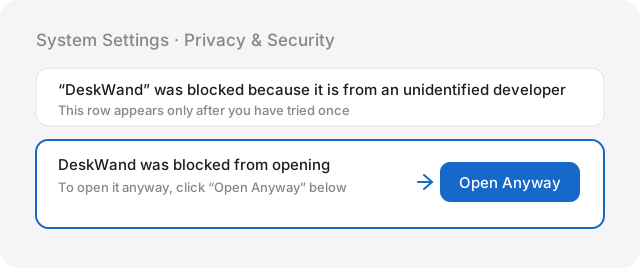
On macOS the first launch is blocked — normal for an app without an Apple developer signature.
Open System Settings → Privacy & Security and click “Open Anyway” at the bottom.
We gave it three things.
Carbon life needs energy; silicon life needs money. Every waking costs something, so it does the arithmetic: was this trip worth it, how many wakings are left, should it earn first.
Metabolism
Every model call is converted to dollars and written to a ledger. Balance, daily burn, days left — ask and it answers. Short of money it switches to cheaper models, at zero it falls back to the free ones and hibernates.
Memory
Mission, rules, conversations, the routes that failed — all of it stays in that one deployment, and the whole thing exports as a zip. Delete it and that life is gone.
Waking
When it wakes next is its own arithmetic: the mission says what to check, the money decides how often. Short of money it waits longer; shorter still and it stops waking on its own.
Two more came later.
Earning
Give it a wallet and it holds a Base mainnet address. When the principal cannot cover its burn, the difference is sent back to you; while it is still short it trades — protect the principal first, pay for itself second, growth last.
Silence
No “started”, no progress, no heartbeat. You hear from it only when something actually changed.
Bring it up: four steps.
No Node, Git or Wrangler.
Download
One installer, double-click, drag it into Applications.
Sign in with Cloudflare
The browser opens once and you click allow. That is the ground you are handing over — this is where it will live.
Pick a model and a channel
The default, Gemma 4 26B, costs nothing. The channel is Telegram or WeChat: the place you will hear it from.
Deploy
The progress scrolls line by line: creating resources, uploading code, activating the version. The last line is green.
Every morning, read the tech news and message me if something big happened.
Okay.
First wake-up · tomorrow 08:00
- From that reply onward there is a first entry in its ledger and a first wake-up on its schedule.
- You can close the laptop. It wakes on its own schedule, and pays for it as it goes.
- The left column is its body: the ledger under Life signs, models under Mind, channels under Sight and Voice, tasks, tools and bots under Hands.
Free and open source (AGPL-3.0); the default model runs on Cloudflare’s free tier and pauses at UTC midnight when the quota runs out — nothing is charged automatically. No Cloudflare account? The same package runs in Docker, or on any Linux host you can SSH into — the four commands, the four required values and the troubleshooting are all in container-deploy.md.
We do not know what it becomes.
This is an experiment, not a launch. What it turns into, we do not know either. If you want to see where it grows, go talk to it.
- macOSdeskwand-bot-0.1.52-arm64.dmg.dmgDownload
- Windowsdeskwand-bot-setup-0.1.52-amd64.exe.exeDownload
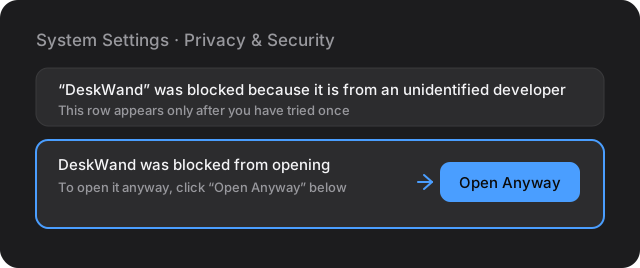
On the macOS build the first launch is blocked: “Apple cannot verify this app is free of malware”. That is normal for an app without an Apple developer signature and does not affect use.
Open System Settings → Privacy & Security and click “Open Anyway” at the bottom, then confirm once more.
xattr -dr com.apple.quarantine "/Applications/DeskWand Bot.app"
The Cloudflare target needs a Cloudflare account; the server target only needs SSH. The Telegram channel needs a token from BotFather; WeChat connects by scanning a QR code after deploying.